

A few words, made simple
- Reading list
- A set of article bookmarks to return to later. It is separate from a treatment plan or personal log.
- Browser storage
- Information a website keeps in the browser profile you are using. It is not the same as cloud account synchronization.
- Source
- The original study, official document or product information behind a statement—not just the headline that summarizes it.
The plain-language takeaway
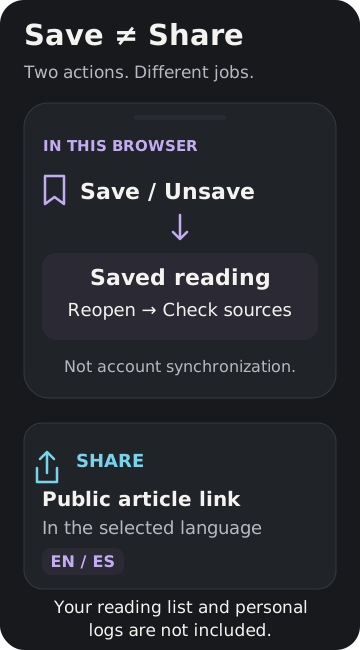
Use Save to remember where to read—not to decide what to use. Signal Axiom's journal reading list keeps article bookmarks in your current browser. The sources, dates and limits still deserve a fresh look when you return. [1]
1. Save one useful guide
Open an article and choose Save beside Share. A successful save changes the button to Unsave and shows a saved confirmation. That is your check that the action worked. Saving is a bookmark, not a downloaded PDF or a promise that the whole article will be available offline. [1]
2. Find it again
Choose Saved reading next to the article controls, or open the journal and select its saved-reading filter. Reopen the guide you want. To remove a bookmark, choose Unsave; this removes it from your list, not from the journal. Start with a few guides tied to questions you actually have rather than saving everything. [1]
3. Recheck the source—not only the summary
Look at the article's publication and source-check dates, then open the sources at the end. Ask who or what was studied: people, animals or laboratory cells? What exact product and outcome were examined? What remains unknown? A saved guide is easier to find, but saving it does not upgrade the evidence or turn an experimental finding into a human result. For a fuller reading check, see “Who was studied? The answer sets the boundary” in the sources below. [3]
Share the article, not your reading list
Open the article in the language you want to send, then use Share beside its Save button. Keep This page selected and choose Copy link—or use the device's share option if available. This article-specific control creates a public English or Spanish article link. It does not include your saved-reading list, personal logs or calculator inputs. On another device, the recipient opens the public article, not a copy of your account. [1]
Why a bookmark may seem to disappear
The current reading list is browser-local, not account-synced. Another device or browser profile may have a different list even if you sign in. Clearing site data can remove it. Private-browsing storage is cleared when the last private tab closes, and browser settings can block saving. [1,2] If Signal Axiom says it could not save, do not assume it succeeded. Check the browser's storage permissions or keep the public article link in your own bookmarks instead.
Practical recap and limits
Save, confirm, reopen, check the source, and share only the public article link you intend. Unsave keeps the list useful. This is a navigation guide, not clinical evidence or a treatment recommendation. It cannot promise permanent storage, cross-device sync or offline access, and bookmarking does not resolve the scientific unknowns described in an article.
Publication and source check
First published October 16, 2026; sources checked October 16, 2026. Instructions were checked against Signal Axiom's current shared reading-list and article-sharing implementation and synthetic persistence tests. Browser-storage behavior was checked against Mozilla's MDN documentation. PeptideDosages.com's About Us page was reviewed only as an editorial usability reference for traceable sources and update context; no prose, tables, graphics or protocols were copied.
Quick check: You saved a guide on your phone, then signed in on a laptop. Should you assume the laptop has the same reading list?
No. The journal's current reading list is stored in that browser, not synchronized through your account. Keep or share the public article link if you need it elsewhere, and verify that any new save shows a confirmation.
Sources
- [1] Signal Axiom shared journal reader and article-sharing behavior. Current implementation and synthetic save/reload/unsave/canonical-link checks reviewed / implementación vigente y pruebas sintéticas revisadas: 2026-10-16.
- [2] Mozilla MDN: Window.localStorage. Last modified / última modificación: 2026-10-12; checked / consultada: 2026-10-16.
- [3] Related reading / Lectura relacionada: Who was studied? The answer sets the boundary. Signal Axiom. Published / publicado: 2026-10-12; checked / consultado: 2026-10-16.
- [4] PeptideDosages.com About Us—editorial usability reference only / solo referencia editorial de usabilidad. Checked / consultada: 2026-10-16.